|
FIELD NAME
Short description
|
DESCRIPTION
🔍 Sample query ✅ Expected result 📖 Learn more
|
|
atime
last accessed time
|
|
|
ctime
last changed time
|
|
|
dir_count
number of recursive directories in a directory
|
🔍 dir_count:22 ✅ Directories containing exactly 22 subfolders, including all nested folders. -
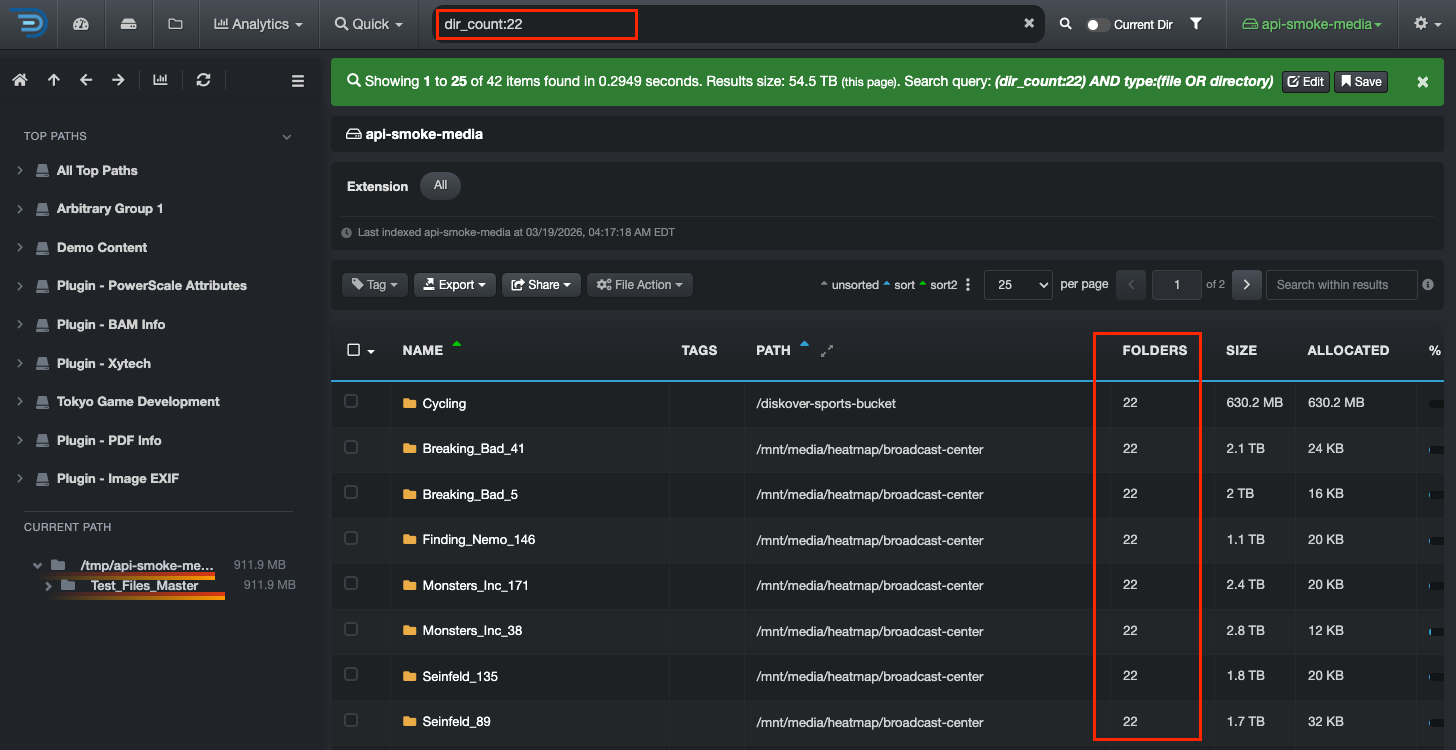 📖 Counts the total number of subfolders inside a directory—this includes subfolders within subfolders, at any depth. This gives a complete view of how many folders exist within a directory.
|
|
dir_count_norecurs
number of non-recursive directories in a directory
|
🔍 dir_count_norecurs:5 ✅ Directories that contain exactly 5 direct subdirectories, without counting any deeper nested folders. 📖 Counts only the direct (top-level) subfolders within a directory. Subfolders inside those folders are not included, making it useful for understanding the structure at a single level. |
|
dir_depth
directory depth in a path
|
🔍 dir_depth:2 ✅ Directories that are exactly 2 levels deep from the starting path, for example: /projects/media/2024 → depth 2 from /projects 📖 Indicates how deep a directory is within a path. A depth of 1 is directly under the starting location, depth 2 is one level deeper, and so on. |
|
extension
file extension
|
🔍 extension:mov ✅ Ensures precise results by returning only files with the exact .mov extension. 📖 Manual searches, such as extension:mov, help refine results by targeting specific file types. A general search for mov may return unrelated matches, such as all_mov_titles_2025.txt, where “mov” appears in the name but is not the file extension. |
|
file_count
number of recursive files inside a directory
|
🔍 file_count:85, file_count:10?, file_count:>100 ✅ Using file_count:>100 example finds directories that contain more than 100 files, including all nested folders.
📖 Counts the total number of files inside a directory, including files in all subfolders. Unlike file_count_norecurs, which only counts files directly inside a folder, file_count includes everything within the directory at any depth. Refer to Advanced Queries | Syntax and Grouping to learn about the equations you can use to build relevant queries.
|
|
file_count_norecurs
number of non-recursive files within a directory
|
🔍 file_count_norecurs:<=100 ✅ Finds directories that contain 100 or fewer files, counting only files directly inside them. 📖 Counts only the files directly within a directory (top level). Files inside subfolders are not included. This makes it useful for quickly assessing folder size at a single level and identifying small or underutilized directories. Refer to Advanced Queries | Syntax and Grouping to learn about the equations you can use to build relevant queries. |
|
file_size
actual file size, not disk usage
|
|
|
file_size_du
disk usage file size, aka allocated size
|
|
|
group
group name associated with a file or directory
|
🔍 group:engineering ✅ Using group:engineering finds all files and directories owned by the engineering group. 📖 Represents the group ownership associated with a file or directory. Group values depend on your system configuration—refer to the User Analysis Report or consult your System Administrator for details. |
|
ino
inode number of a file or directory
|
🔍 ino:8838389885 ✅ Finds files or directories with that inode number. More than one result may appear when searching across multiple filesystems. 📖 An inode is an identifier assigned by the filesystem. It can help track an item within the same filesystem even if it is renamed, but inode numbers are not globally unique across storage systems. It can also help identify files that share the same data (hardlinks). Learn about the differences between inodes and hash value → |
|
mtime
last modified time
|
|
|
name
file or directory name
✏️ value is case sensitive
|
🔍 name:*report* ✅ Returns all files and directories that contain the word report anywhere in their name. 📖 Matches exact or partial text depending on how the query is written (exact match, wildcard, etc.) |
|
name.text
full-text search analysis applied to file or directory name, enabling tokenization, stemming, and case-insensitive matching
✏️ value is not case sensitive
|
🔍 name.text:report ✅ Finds files and directories containing report, regardless of case or word position. 🔍 name.text:rep* ✅ May return results like Report_Q1.pdf or weekly_report.xlsx, even if rep is only part of the word. 🔍 name.text:quarterly report -
✅ Prioritizes phrase matching (words together in order):
Woud find → Quarterly Report.pdf, Quarterly_Report_2025.xlsx Might find → The Quarterly Report Final.docx (depending on tokenization) Would likely not find → Report_Quarterly_Draft.pdf (words in different order)
📖 Enables full-text search on file and directory names, making searches more flexible and forgiving compared to the standard name field. |
|
nlink
number of hardlinks pointing to a file or directory
|
🔍 nlink:3 ✅ For files → finds files with 3 hardlinks (i.e., the same file exists in 3 locations or names). ✅ For directories → reflects the number of subfolders (each subfolder increases the link count). |
|
owner
owner name associated to a file or directory
|
🔍 owner:Chris ✅ Using owner:Chris finds all files and directories owned by Chris 📖 Identifies the owner associated with a file or directory. Owner values depend on your system configuration—refer to the User Analysis Report or consult your System Administrator for details. |
|
parent_path
full directory path where a file or subdirectory is located
✏️ value is case sensitive
|
🔍 parent_path:*images* -
✅ Returns all files and directories located in folders whose path contains images:
📖 Matches exact or partial text depending on how the query is written (exact match, wildcard, etc.) |
|
parent_path.text
full-text search analysis applied to parent directory paths, enabling tokenization, stemming, and case-insensitive matching
✏️ value is not case sensitive
|
🔍parent_path.text:projects ✅ Finds files and directories within any path containing projects, regardless of case or position. 🔍 parent_path.text:media ✅ May return results like /Media_Archive/film.mov, /projects/media_storage/ or /backup/media-files/, even if media is only part of the folder name. 🔍 parent_path.text:final edits -
✅ Prioritizes phrase matching (words together in order):
Would find → /projects/final edits/scene1.mov or /archives/Final_Edits/ Might find → /storage/final-edits_backup/ or /FinalEdits/scene2.mp4 Would likely not find → /projects/edits_final/ or /backup/final version edits/
📖 Enables full-text search on directory paths, making searches more flexible and forgiving compared to the standard parent_path field. |
|
size
total file and/or directory size, including all nested/recursive contents
✏️ value must be in bytes
|
🔍 size:>32212254720 ✅ Finds files or directories larger than 30 GB, including everything inside nested folders. 📖 Counts the total size of a file or directory. For directories, this includes all files and subfolders at any depth. Learn more about how to manually search for data size → |
|
size_norecurs
size of files directly inside a directory, excluding nested/non-recursive subdirectories
✏️ value must be in bytes
|
🔍 size_norecurs:>32212254720 ✅ Finds directories with more than 30 GB of files directly inside them, without counting nested subfolders. 📖 Counts only the size of files at the top level of a directory. Files inside subfolders are not included. Useful for understanding directory size at a single level. Learn more about how to manually search for data size → |
|
size_du
actual disk usage of a file or directory, including all nested/recursive contents
✏️ value must be in bytes
|
🔍 size_du:>32212254720 ✅ Finds files or directories using more than 30 GB of actual disk space, including everything inside nested folders. 📖 Measures actual disk space used, which may differ from file size because it includes filesystem overhead and allocation. For directories, this includes all files and subfolders at any depth. Learn more about how to manually search for data size → |
|
size_du_norecurs
actual disk usage of files directly inside a directory, excluding nested/non-recursive subdirectories
✏️ value must be in bytes
|
🔍 size_du_norecurs:>32212254720 ✅ Finds directories where the files directly inside them use more than 30 GB of actual disk space, without counting nested subfolders. 📖 Measures actual disk space used at the top level of a directory only. Files inside subfolders are not included. Useful for analyzing disk usage at a single level without deeper folder contents. Learn more about how to manually search for data size → |
|
tags
user-defined labels applied to files or directories
|
🔍 tags:delete ✅ Finds all files and directories tagged delete. 📖 Tags help organize, categorize, and take action on data by adding custom labels to files and directories. Learn about tags → |
|
type
filter results by file or directory type
✏️ value must be lowercase
|
|

Comments
0 comments
Please sign in to leave a comment.